
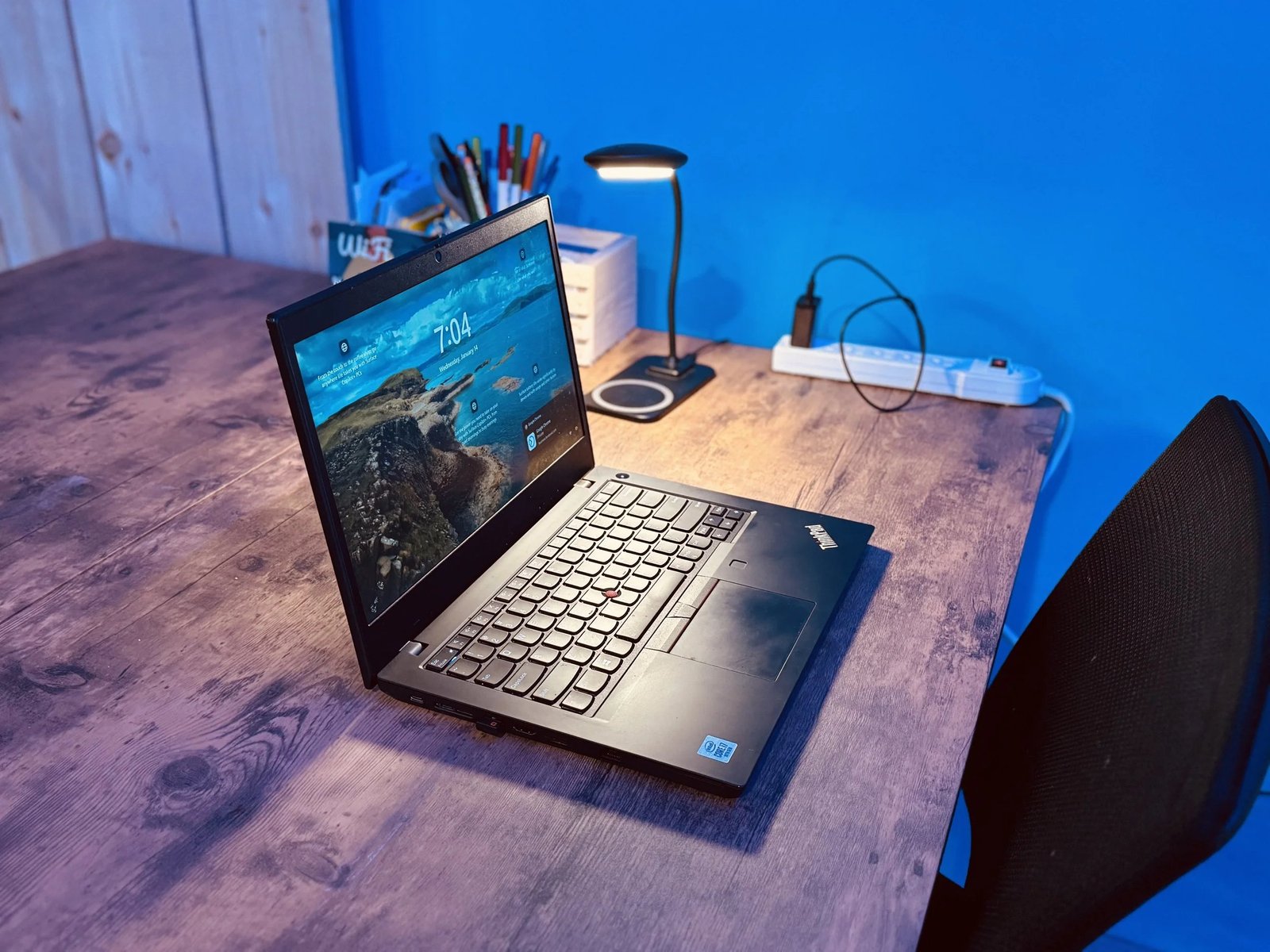
Short answer: yes, a refurbished laptop is worth buying for everyday work — it’s one of the best values in tech. A 2–3-year-old business-class laptop (ThinkPad, Latitude, EliteBook) at 40–60% off original price will outperform most brand-new budget laptops while being built far better. But the word “refurbished” covers everything from manufacturer-certified to some guy wiping a laptop with a cloth, so where you buy matters enormously.
I’ve bought refurbished ThinkPads for myself and family for years. Here’s the full honest breakdown.
Why Refurbished Business Laptops Are the Secret Deal
Here’s what most shoppers miss: there’s a two-tier market. Consumer laptops ($400–$700 new) are built to a price — flexy plastic, mediocre keyboards. Business laptops ($1,200–$2,000 new: ThinkPad T/X series, Dell Latitude, HP EliteBook) are built to survive corporate fleets — magnesium frames, spill-resistant keyboards, MIL-SPEC testing.
Companies lease these by the thousand and return them after 2–3 years. They flood the refurb market at $250–$450 — and a 3-year-old ThinkPad T14 is, in build quality and keyboard feel, a better machine than a brand-new $500 consumer laptop. The specs (Ryzen 5/Intel i5, 16 GB RAM, 256–512 GB SSD) are still plenty for everyday work in 2026.
This is the entire game: yesterday’s premium at today’s budget price. For email, Office, browsing, Zoom, and light photo work, it’s genuinely the smart-money move.
Where to Buy: Ranked by Trust
- 1. Manufacturer refurbished (Dell Refurbished, Lenovo Outlet, Apple Refurbished): the gold standard — inspected, genuine parts, often new battery, full 1-year warranty. Costs a bit more, worth it for peace of mind.
- 2. Back Market: my top third-party pick — standardized grading, minimum 1-year warranty, 30-day returns. The “Excellent” grade is genuinely excellent.
- 3. Best Buy / Amazon “Renewed”: solid, returnable, with real customer protection. Check the seller ratings on Amazon Renewed.
- 4. eBay reputable refurbishers: great prices from high-volume sellers (look for 99%+ feedback, thousands of sales, stated warranty). Read the listing carefully — condition descriptions vary.
- 5. Local computer shops: underrated — you can inspect before buying and get local support. Ask about their warranty.
Avoid: no-name sellers with no warranty, “as-is” listings, and prices that seem too good — a $150 “ThinkPad” is either ancient or broken. Legitimate refurbished business laptops cluster in that $250–$450 range for a reason.
The 6 Checks Before You Buy
- 1. Warranty included? Minimum 90 days; 1 year is the good standard. No warranty = no deal. Period.
- 2. Battery health: refurbished batteries vary — ask for the health report or cycle count. Budget $50–$80 for a replacement battery if it’s weak; here’s how to make laptop batteries last.
- 3. Exact specs, not just the model: “ThinkPad T480” could mean i5/8 GB or i7/32 GB. Confirm CPU, RAM (16 GB ideal, 8 GB minimum for Windows 11), storage size, and screen resolution (1080p minimum — avoid 1366×768 screens, they’re miserable).
- 4. Keyboard and trackpad test: every key, both mouse buttons. Business laptops have great keyboards — make sure yours wasn’t abused.
- 5. Ports and wifi: test every USB port, the charger connection, and wifi on both bands. Loose charging ports are a common refurb miss.
- 6. Cosmetic grade honesty: “Scratch and dent” units are the value play — same internals, ugly outside, 20% cheaper. For a work machine nobody sees, who cares about a scuffed lid?
Refurbished vs. New Budget Laptop: Head-to-Head
The real decision most people face: $350 refurbished ThinkPad vs. $450 new budget laptop. Here’s how they compare:
- Build quality: refurbished business wins by a mile — metal chassis vs. creaky plastic.
- Keyboard/trackpad: refurbished business wins — ThinkPad keyboards are legendary for a reason.
- Performance: roughly even — a 2021 i5/Ryzen 5 matches a 2024 budget CPU for everyday tasks.
- Battery life: new budget usually wins — fresh battery vs. a used one. (Though many refurbs get new batteries.)
- Screen: often the refurb wins — business laptops had better 1080p panels; budget laptops still ship dim 250-nit screens.
- Warranty/support: new wins — 1 year manufacturer vs. 90 days–1 year refurb.
- Windows 11 compatibility: check this! Anything with an 8th-gen Intel or newer (2018+) is fine; older may be stuck on Windows 10.
My verdict: for everyday work (the question asked!), refurbished business wins on value. For gaming or creative work, buy new — you want the modern GPU/CPU. And if you’re choosing between categories entirely, our Chromebook vs Windows breakdown might change the equation.
After You Buy: the Refurb Setup Routine
- Fresh Windows install. Even from reputable sellers, wipe and reinstall Windows yourself — it removes bloatware, mystery accounts, and any lingering issues. Use Microsoft’s Media Creation Tool; the license is tied to the motherboard and reactivates automatically.
- Update everything: Windows Update, then the manufacturer’s driver page (Dell/Lenovo have auto-detect tools).
- Check the SSD health with CrystalDiskInfo (free) — confirm the drive is healthy, and consider upgrading to a bigger SSD while you’re at it; it’s cheap and transformative.
- Test the battery over a few real workdays before the return window closes.
- Register the warranty — refurb warranties usually need activation.
Total setup time: about two hours, mostly waiting on updates. What you get: a $1,500-class machine for $350 that’ll handle everyday work for 3–5 more years. That’s the refurb promise, and when bought right, it delivers. Energy Star’s refurbished buying notes add an environmental angle — reusing a laptop saves roughly 190 kg of CO₂ vs. manufacturing new.
Keep Reading
If this was useful, you might also like upgrading to a bigger SSD and our Chromebook vs Windows breakdown.
The Bottom Line
Yes — buy the refurbished business laptop. Target a ThinkPad T/X, Dell Latitude, or HP EliteBook from 2019–2022 with 16 GB RAM and a 1080p screen, from a seller offering at least a 90-day warranty (Back Market, manufacturer outlets, Amazon Renewed). Fresh-install Windows on arrival. You’ll get premium build quality at budget prices — the best value in everyday computing.
Frequently Asked Questions
How much should I pay for a refurbished laptop?
For a 2–4-year-old business-class laptop (i5/Ryzen 5, 16 GB RAM, SSD): $250–$450. Under $200 usually means very old or compromised; over $500 and you’re approaching new-laptop territory where the value proposition flips.
Do refurbished laptops come with Windows?
Reputable sellers include a licensed Windows installation (the license is tied to the motherboard). Always do a fresh install yourself on arrival for security and cleanliness.
Is a refurbished laptop good for students?
Excellent — it’s arguably the best student value. A $300 refurbished ThinkPad handles essays, research, and Zoom for four years of college, and if it gets stolen from the library, you’re out $300, not $1,200.





One Comment