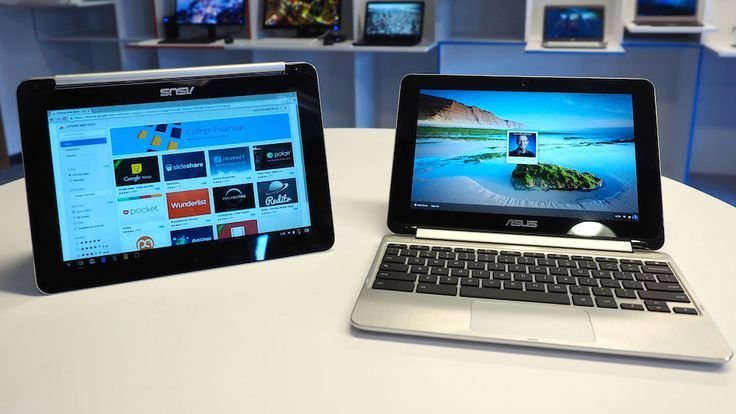
The Chromebook vs Windows laptop debate has a refreshingly simple answer once you know how you actually use a computer. For everyday use — browsing, email, streaming, documents, video calls — a Chromebook is genuinely the better buy for most casual users: cheaper, faster to start, and nearly impossible to break with viruses. But the moment you need specific software, Windows wins without a contest.
I’ve used both as daily drivers, and here’s my honest take: people overthink this. It comes down to one question — do you live in a browser, or do you live in desktop apps?
What a Chromebook Actually Is (and Isn’t) in 2026
A Chromebook runs ChromeOS — basically the Chrome browser turned into a full operating system, with Android apps and (on many models) Linux support layered on. Everything revolves around Google’s ecosystem and the web.
What that means day to day:
- Boot in seconds, updates install silently in the background, no antivirus needed, and the whole thing is very hard to mess up.
- Google Docs, Sheets, Gmail, YouTube, Netflix, Zoom — all flawless, since they’re just websites or Android apps.
- Offline works better than its reputation — Gmail, Docs, and many Android apps function offline now. But a Chromebook with no internet is still a sadder device than a Windows laptop with no internet.
The honest limitation: if a task requires installing traditional desktop software, you’re stuck. Which brings us to…
When Windows Is Clearly the Better Choice
Buy the Windows laptop if any of these describe you:
- You need Microsoft Office desktop apps (not just the web versions), Adobe Creative Suite, AutoCAD, or any specialized work software.
- You’re a gamer — even casual gaming is dramatically better on Windows. Chromebooks can stream games via GeForce Now, but it’s not the same.
- You do video editing, music production, or programming beyond the basics. (Chromebooks can run Linux and VS Code now, but it’s a compromise.)
- You need to run company-specific software or connect to workplace systems built for Windows.
Windows laptops also offer far more choice: $300 budget machines up to $2,000 ultrabooks, 2-in-1s, gaming rigs — every shape and price. Chromebook hardware tops out around $700–$900 for premium models like the Acer Chromebook Spin 714, and the selection is narrower.
The Price and Longevity Math
This is where Chromebooks shine hardest. A $250–$350 Chromebook feels fast and stays fast for years, because ChromeOS is light. A $300 Windows laptop, frankly, often feels sluggish out of the box and gets worse — Windows 11 wants more RAM and a faster drive than budget machines provide.
My rule of thumb:
- Under $400: Chromebook wins, easily. A $300 Chromebook outperforms a $300 Windows laptop for everyday tasks.
- $500–$800: the real battleground. A decent Windows laptop here (Ryzen 5 or Core i5, 16 GB RAM, SSD) is genuinely good and far more versatile.
- Over $800: just buy Windows (or a Mac). Premium Chromebooks exist but make little sense at that price.
Also check the Auto Update Expiration (AUE) date on any Chromebook — Google guarantees updates until that date (usually 8–10 years from release now). Don’t buy a model with only 2–3 years of updates left, no matter how cheap. And if you’re buying used on a budget, our guide to whether a refurbished laptop is worth it covers what to check.
Who Should Buy Which: the Short Version
Get a Chromebook if: you’re a student, a parent buying for a kid, or someone whose computer life is Gmail, Docs, YouTube, and video calls. It’s also my top recommendation as a second/travel laptop — cheap, light, and if it gets stolen you’re out $300, not $1,200.
Get a Windows laptop if: you need specific desktop software, game, do creative work, or just want one machine that can do literally anything. The versatility is worth the extra cost and occasional maintenance headache.
My personal setup, for what it’s worth: a Windows desktop for heavy work and a Chromebook for the couch. Total cost less than one premium ultrabook, and each does its job perfectly. If you’re deciding between a tablet and laptop instead, this breakdown might help — and Google’s Chromebook site lists current models with their update expiration dates.
The Third Option: a Used MacBook
Can I offer a third path nobody talks about enough? A used M1 MacBook Air — now selling for $500–$650 on Swappa and Apple’s refurbished store — embarrasses both budget Chromebooks and budget Windows laptops. It’s silent (no fan), the battery genuinely lasts 14–18 hours, and it runs everything from Chrome to full Adobe apps to proper development tools.
The catch: macOS has its own software quirks, and if your school or job requires Windows-only software, this advice is useless to you. But for writers, students in non-technical majors, and general everyday use, a used M1 Air is — in my honest opinion — the best value in all of laptops right now.
My buying hierarchy at the $500–$700 budget: used M1 MacBook Air first, then a solid mid-range Windows laptop (Ryzen 5/16 GB RAM), then a premium Chromebook. Under $400, the Chromebook still wins outright — nothing touches it at that price. The point is just: don’t assume your only choices are new Chromebook vs new Windows. The used market changes the math completely.
Keep Reading
If this was useful, you might also like whether a refurbished laptop is worth buying and tablet or laptop for reading and browsing.
The Bottom Line
Everyday browser-based life → Chromebook (better value under $400, simpler, more secure). Specific software, gaming, or creative work → Windows laptop (more versatile, more choice). Be honest about which camp you’re in, check the Chromebook’s update expiration date before buying, and don’t pay Windows money for Chromebook limitations.
Frequently Asked Questions
Can a Chromebook replace a laptop for college?
For most majors, yes — essays, research, email, and video calls all work great. Exceptions: engineering, architecture, film, and some business programs that require Windows-only software. Check your department’s requirements first.
Do Chromebooks work without internet?
Partially. Gmail, Google Docs, and downloaded media work offline, and many Android apps do too. But a Chromebook is at its best with a connection — if you’re often offline, lean Windows.
How long does a Chromebook last?
Hardware easily lasts 5+ years for light use. The real limit is Google’s Auto Update Expiration date — after that you stop getting security updates. Current models get roughly 8–10 years from their release date.