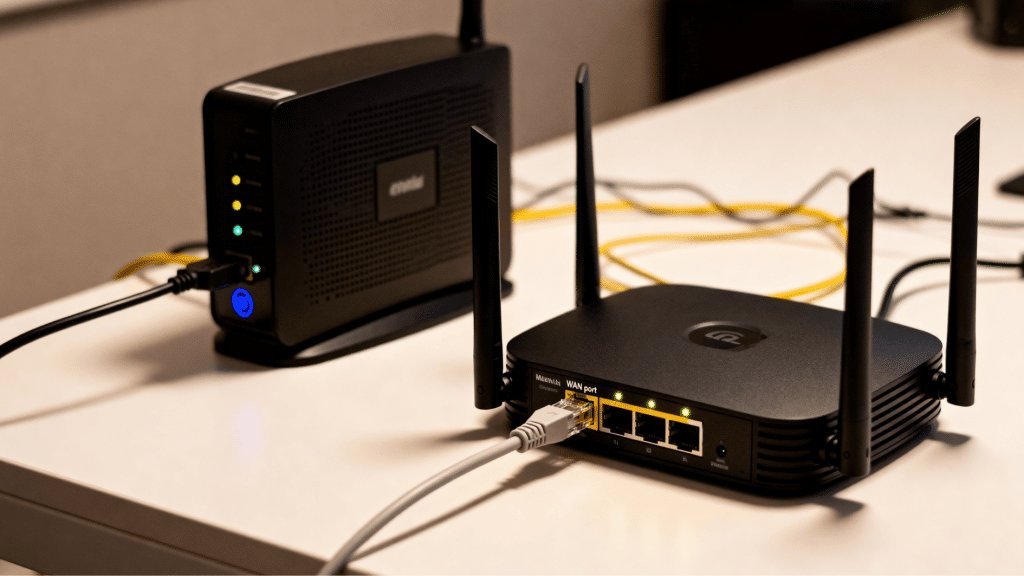
Two boxes, blinking lights, and everyone uses the words interchangeably — no wonder people ask what the difference between a modem and a router is. Here’s the simplest version: the modem connects your home to the internet (talks to your ISP), and the router shares that connection with all your devices (creates your wifi).
Think of it like this: the modem is the front door to the internet, and the router is the hallway that leads every room in your house to that door. You need both to get online — though these days they often come mashed into one box, which is where the confusion starts.
The Modem: Your Home’s Connection to the Internet
The modem’s one job: translate. The internet arrives at your house as a signal your devices can’t understand — over coaxial cable, phone line, or fiber — and the modem converts it into standard digital data your network can use.
- Cable modem: connects via the same coaxial cable as cable TV. (Most common in the US.)
- DSL modem: uses phone lines. Fading away, but still around in rural areas.
- Fiber ONT: fiber’s equivalent — usually installed by the provider, converts light signals to data.
- 5G home internet gateway: the modem is a cellular radio talking to a tower.
Key fact: a modem by itself typically has one ethernet port and no wifi. Plug one computer directly into a modem and that computer gets internet — but nothing else in the house does. The modem also handles your authentication with the ISP — it’s the device your provider recognizes as “your account.”
The Router: Your Home’s Traffic Director (and Wifi)
The router plugs into the modem and does three jobs:
- 1. Shares the connection: takes the single internet feed from the modem and splits it among all your devices — phones, laptops, TVs, smart bulbs — giving each a local address and routing traffic correctly.
- 2. Creates your wifi network: the network name (SSID) and password you connect to? That’s the router broadcasting.
- 3. Protects you: the router’s built-in firewall and NAT (network address translation) mean the internet at large can’t see your individual devices — just the router. It’s a genuine security layer.
Modern routers also handle parental controls, guest networks, QoS (prioritizing video calls over downloads), and device management through a phone app. When people say “my wifi is slow,” they’re talking about the router’s job — which has its own troubleshooting playbook.
Why the Confusion: Combo Units (Gateways)
Here’s why nobody can keep them straight: most ISPs hand you a gateway — a single box that’s a modem and router combined. Comcast’s Xfinity box, Spectrum’s router, AT&T’s gateway — all combos.
Combos are convenient but usually mediocre: the wifi is average, the features are basic, and you’re paying $10–$15/month in rental fees — $120–$180 a year, forever, for a $150 box. That’s the real reason to understand the difference.
My recommendation for cable internet: buy your own modem (a Motorola MB7621 or Arris SURFboard, ~$80–$100 — check your ISP’s approved list first) and pair it with your own router. The modem pays for itself in 6–8 months, you get better wifi from a router you chose, and you stop paying rent on a box. For fiber, you usually must use the provider’s ONT but can still use your own router behind it.
How They’re Wired Together (the 2-Minute Setup)
The chain is always: wall → modem → router → your devices.
- Coaxial/phone/fiber line from the wall plugs into the modem.
- An ethernet cable runs from the modem’s port to the router’s WAN/Internet port (usually colored differently or labeled).
- Your devices connect to the router — via wifi or its LAN ports.
Troubleshooting order matters: if the internet is down, check the modem’s lights first — no “online” light means the ISP connection is down (their problem). Modem fine but no wifi? That’s the router. This 10-second diagnosis saves so many pointless support calls. And if you’re trying to stretch coverage with old gear, an old router can become a wifi extender — now you know exactly which box does what.
Quick Glossary: Terms You’ll See on the Box
- SSID: your wifi network’s name. That’s it.
- Dual-band / tri-band: the router broadcasts on 2.4 GHz (longer range) and 5 GHz (faster) — sometimes 6 GHz too. Your devices pick automatically.
- DOCSIS 3.0 / 3.1: the cable modem standard. DOCSIS 3.1 supports gigabit speeds — get 3.1 if your plan is 300+ Mbps.
- Mesh: multiple router units working as one network (great for big homes).
- WAN vs LAN: WAN = the port facing the internet (modem side); LAN = ports facing your devices.
You don’t need to memorize these — but recognizing them stops the box in the store from being intimidating. The only specs that really matter for most buyers: DOCSIS 3.1 on the modem (for cable), and wifi 6 on the router.
Keep Reading
If this was useful, you might also like the troubleshooting playbook for wifi problems and turning an old router into a wifi extender.
The Bottom Line
Modem = connects your home to the internet. Router = shares it with your devices via wifi. They’re often combined into one ISP-rented gateway, but buying your own modem (~$90, pays for itself in months) plus a decent router gives you better wifi and kills the monthly rental fee. Remember the chain — wall → modem → router → devices — and you’ll troubleshoot like a pro.
Frequently Asked Questions
Do I need both a modem and a router?
Yes — you need the modem’s function (ISP connection) and the router’s function (wifi/sharing). They can be two boxes or one combo gateway, but both jobs must be done by something.
Can I just use the router my ISP gave me?
You can, but you’re likely paying $10–$15/month rental for mediocre hardware. Buying your own modem and router typically pays for itself within a year and gives you better performance and control.
What’s the difference between a router and wifi?
Wifi is the wireless signal; the router is the device that creates it (among other jobs). Saying ‘the wifi is down’ usually means the router needs attention.