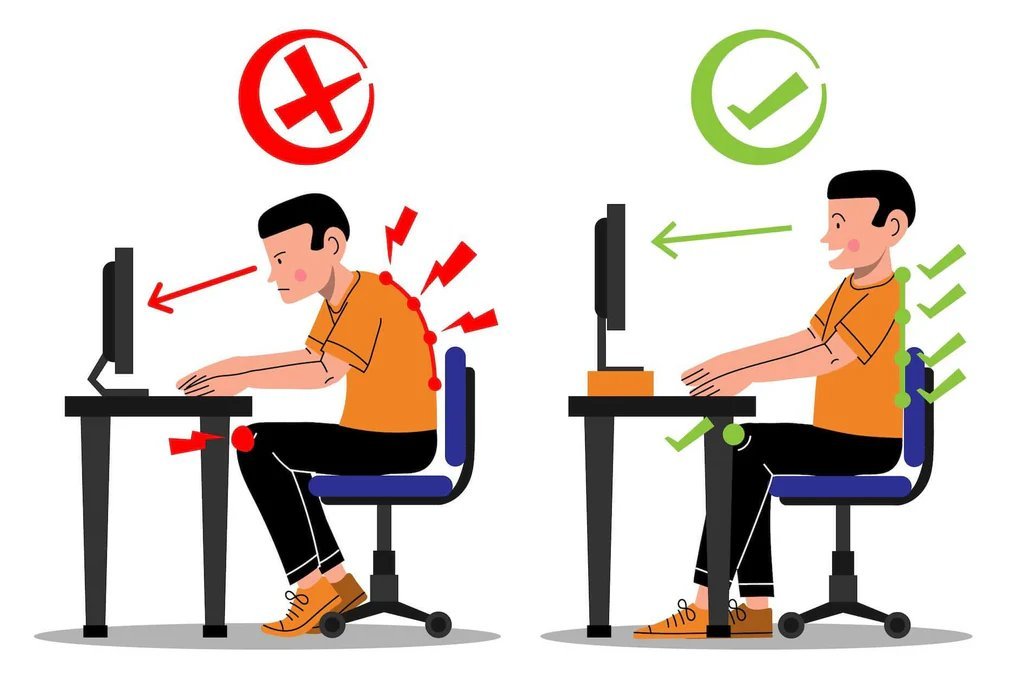
By 3 p.m., most desk workers look like a question mark: shoulders rolled forward, chin jutting toward the screen, lower back screaming. I know the feeling well — and I also know that most posture advice boils down to ‘sit up straight,’ which lasts about four minutes before you melt back into the chair. The question of how can I improve my posture while working at a desk comes up constantly — here’s what actually works.
Good news: fixing desk posture doesn’t require a $1,500 ergonomic setup. It’s mostly about arranging what you have correctly and building small movement habits. Here’s the practical version — the setup, the stretches, and the tricks that keep you upright without constant willpower.
Set Up Your Desk So Good Posture Is Automatic
Here’s the truth most posture guides bury: willpower loses to environment every time. If your monitor is too low, you WILL crane your neck down — no amount of reminding yourself fixes physics. So start with setup. Your monitor’s top edge should be at or slightly below eye level, about an arm’s length away. Stack it on books if you need to; I’ve done it and it works fine. OSHA ergonomics guidance for computer workstations
Chair height matters more than chair price. Your feet should rest flat on the floor with knees at roughly 90 degrees, and your keyboard should sit so your elbows rest near 90 degrees too. If your shoulders hike up to reach the keyboard, your desk is too high — a cheap keyboard tray or even a lower table fixes it. The goal is a setup where slouching actually feels like effort.
- Monitor at eye level: top of screen at or just below eye level, one arm’s length away.
- Feet flat, knees at 90°: adjust chair height first; use a footrest if your feet dangle.
- Keyboard and mouse close: elbows near 90°, shoulders relaxed — no reaching forward.
- Laptop users, get a riser: a laptop flat on a desk guarantees neck strain. Riser + external keyboard is the fix.
- Phone at eye level: ‘text neck’ is real. Bring the phone up instead of dropping your head down.
The 5-Minute Daily Reset Your Spine Needs
Even a perfect setup can’t save you from eight motionless hours — the human body simply isn’t built for stillness. What your spine actually needs is regular movement breaks, and they don’t need to be long. Every 30 to 60 minutes, stand up for one to two minutes. Walk to get water, do a doorway chest stretch, roll your shoulders. That’s it. The research on ‘movement snacks’ is genuinely encouraging.
Add one short daily stretch routine targeting the desk-worker problem areas: tight chest, weak upper back, stiff hip flexors. Five minutes in the evening reverses most of the day’s damage. I do doorway stretches and a simple chin-tuck exercise, and the difference in my neck tension after two weeks was honestly surprising.
- Doorway chest stretch: forearms on the doorframe, lean forward gently — hold 30 seconds, twice.
- Chin tucks: pull your chin straight back (make a double chin) — 10 reps to strengthen deep neck muscles.
- Shoulder blade squeezes: pinch shoulder blades together, hold 5 seconds, 10 reps.
- Hip flexor stretch: half-kneeling lunge, 30 seconds per side — undoes hours of sitting.
- Cat-cow on all fours: 10 slow rounds to mobilize the whole spine.
Habits That Keep You Upright All Day
Beyond setup and stretching, a few habits make good posture the default rather than a chore. The single best one: change positions regularly. Sit, stand if you can, perch, walk — variety beats any single ‘perfect’ position. If you have a sit-stand desk, alternate every hour. If not, phone calls are a perfect excuse to stand and pace.
Also, strengthen the muscles that hold you upright. Posture isn’t just flexibility; it’s strength. Rows, face pulls, and dead hangs build the upper back that keeps shoulders from collapsing forward. Two short strength sessions a week will do more for your posture than any posture-correcting gadget. Mayo Clinic guidance on posture and back health
- Set a movement timer: a phone reminder every 45 minutes beats relying on memory.
- Take walking meetings: phone calls don’t need a chair. Pace and talk.
- Strengthen your upper back: rows and face pulls twice weekly — the real posture fix.
- Sleep on a decent pillow: a pillow that keeps your neck neutral undoes nighttime strain.
- Ditch the posture brace: braces weaken the muscles you’re trying to build. Strength over support.
Common Mistakes to Avoid
Let me save you some trial and error. These five mistakes are the reason most people’s efforts in this area stall out — and each one is completely avoidable with a minute of awareness.
- Buying an expensive chair before fixing monitor height: a $1,000 chair can’t fix a monitor that’s 6 inches too low. Setup geometry beats furniture price.
- Only fixing posture while thinking about it: conscious ‘sitting up straight’ lasts minutes. Change the environment so good posture is automatic.
- Sitting perfectly still in the ‘right’ position: even perfect posture held for 8 hours causes problems. Movement matters more than position.
- Ignoring your phone posture: you fix your desk setup then crane over your phone for 3 hours. Bring the phone up to eye level.
- Using a posture brace long-term: braces weaken the muscles that should hold you upright. Strength training beats external support.
Frequently Asked Questions
Is a standing desk better for posture?
It’s different, not automatically better — prolonged standing has its own issues (leg fatigue, varicose veins). The real win is a sit-stand desk used to alternate positions hourly. If choosing one static setup, a well-arranged sitting desk beats a poorly-used standing one.
How long does it take to fix bad posture?
Noticeable improvement in 2-4 weeks of consistent setup fixes plus daily stretching; meaningful postural change in 2-3 months with strength work. You’re reversing years of habit — but the pain relief often comes much faster than the visible change.
Do posture corrector devices work?
Temporarily, as reminders — but they don’t strengthen anything and long-term use weakens muscles. Think of them as training wheels at best. The permanent fix is setup + movement + strength.
Why does my neck hurt even with a good setup?
Common culprits: phone use (text neck), sleeping position (wrong pillow height), stress-related shoulder tension, or a monitor that’s still slightly off. Also check that you’re taking movement breaks — even perfect setups fail without them.
Pro tip: Revisit this guide in 30 days. You’ll catch details you missed the first time, and the second read tends to stick because you’ve got real experience to attach it to.
How can I improve my posture while working at a desk: The Bottom Line
Better desk posture comes from three things: a setup where good posture is the path of least resistance (monitor at eye level, feet flat, elbows at 90°), movement breaks every 30-60 minutes plus a 5-minute daily stretch routine, and upper-back strength built twice a week. You don’t need expensive gear — you need your environment working for you instead of against you. Start with the monitor height today; your neck will notice by Friday.